Why Complain Script is a Go-To Font for Modern Designers
Understanding the Charm of This Premium Script Font
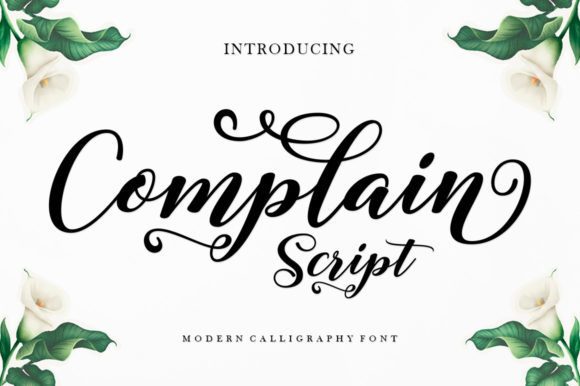
When you first encounter Complain Script, the immediate impression is one of sophisticated fluidity. It isn’t just another generic handwritten font; it is a ravishing script typeface that bridges the gap between raw, organic calligraphy and polished, modern typography. If you look closely, you will notice the neat craftsmanship and high level of detail in every curve and terminal. Unlike many display fonts that rely on gimmicks, Complain Script offers a timeless elegance that feels personal yet professional. It captures the rhythm of a hand-lettered piece but maintains the consistency required for commercial use, making it a standout asset in any designer's library.
The visual personality of this typeface is defined by its smooth connections and balanced x-height. It avoids the overly scratchy look of some distressed fonts while steering clear of the sterile perfection of vectorized scripts. This balance is crucial. It allows the font to carry a "ravishing" aesthetic—meaning it looks luxurious and inviting—without sacrificing legibility. Whether you are designing a high-end logo or a rustic wedding invitation, the font adapts to the emotional tone of the content. It feels familiar yet distinct, a quality that is hard to find in the crowded market of script fonts.
Strategic Applications: Where Complain Script Excels
The versatility of Complain Script is one of its strongest selling points. In my experience, certain typefaces are "one-trick ponies"—they work for a birthday card and nothing else. This font, however, transitions seamlessly across various mediums.
Branding and Logo Design
For entrepreneurs and small business owners, a logo needs to tell a story instantly. Complain Script is particularly effective for brands that want to convey warmth, authenticity, or artisanal quality. Think of a boutique coffee roaster, a high-end florist, or a personal styling service. The font’s fluid motion creates a strong visual identity that feels approachable. Because it is highly detailed, it scales well for primary logos, though you should always test it at smaller sizes to ensure the thinner strokes remain visible.
Digital Presence and Web Design
In the digital realm, attention spans are short. Using a creative font like this for website headers or hero text can immediately set the mood. It works beautifully as a contrast element when paired with a clean, geometric sans serif font. For example, using Complain Script for a "Welcome" headline creates an immediate emotional connection with the visitor, while a sans serif body text ensures the technical information remains easy to read on screens.
Packaging and Editorial Design
Packaging design is where typography often makes or breaks the shelf appeal. Complain Script shines here because of its high detail. On a physical product, such as a wine bottle label or a cosmetic box, the font adds a touch of luxury. In editorial design, such as magazine pull quotes or chapter headings, it breaks up the monotony of standard serif or sans serif blocks, guiding the reader's eye and adding a rhythmic pause to the layout.
The Technical Edge: PUA Encoding and Accessibility
A beautiful font is useless if it is difficult to use. This is where Complain Script offers a significant technical advantage: it is PUA (Private Use Areas) encoded. For the non-designer, this might sound like jargon, but it is a practical game-changer.
PUA encoding means that every single glyph, swash, and alternate character is accessible regardless of what software you are using. Often, advanced font features are locked away in complex OpenType panels that require professional software like Adobe Illustrator or InDesign. However, because Complain Script is PUA encoded, you can access all those lovely swashes and stylistic alternates even in basic programs. This empowers hobbyists and crafters using tools like Silhouette Studio, Cricut Design Space, or even Microsoft Word to create professional-grade typography without needing a degree in graphic design.
Practical Guide to Pairing and Readability
As a design professional, my advice regarding script fonts is always centered on context. Complain Script is a display font, meaning it is designed for impact, not necessarily for long-form body text. Here is how to evaluate its fit for your project:
- The Pairing Strategy: Because Complain Script is flowing and ornate, it demands a partner that is quiet and structured. Avoid pairing it with other decorative fonts. Instead, look for a sturdy sans serif or a classic serif font. The contrast between the organic script and the structured secondary text creates a professional visual hierarchy that guides the viewer’s eye.
- Readability Checks: While the font is legible, you must be mindful of size. If you are using it for a logo, print it out. Does the "e" close up? Do the connecting strokes blur together? This is particularly important for web design, where screen resolution varies.
- Licensing for Commercial Use: Before using Complain Script on merchandise you intend to sell, verify the license. Most premium fonts require a specific license for print-on-demand or physical goods. Ensuring you have the correct commercial license protects your business and supports the type designers who crafted these detailed assets.
Ultimately, adding Complain Script